How Narratyr fits into your game
Description: Connect Narratyr to your game through exports, runtime plugins, variables, and functions.
Prerelease. The engine plugins are still in development, so some details may change.
Create dialogues and quests in Narratyr, then export them to your game project. A plugin in your engine runs the exported graphs during play. Narratyr provides plugins for Unreal Engine, Godot, and Unity. The export format also supports integrations with other engines.
The same integration model applies to each engine. Exporting and the engine pages provide instructions for specific buttons, files, and classes.
Export output
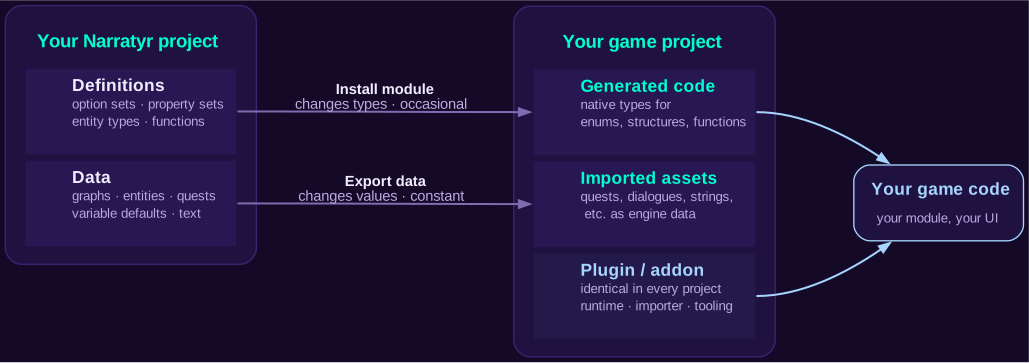
An export creates three types of output.
Plugin
The plugin contains reusable runtime and import code. It runs graphs, evaluates expressions, stores variable state, and imports exported files. Projects use the same plugin code, while project-specific content remains in generated code and imported assets.
Generated output
Generated code defines types for your project. Option sets become enumerations, property sets become structures, entity types become row types, and function declarations become methods for your game to implement.
These generated types let the editor in your engine validate the project's data. A Faction
property appears as an enumeration in the engine editor instead of an unrestricted string.
Imported assets
Imported assets contain graphs, entities, variable defaults, quest definitions, and localized text. The exporter converts this content into the data asset format for your engine. The plugin then loads those assets at runtime.
Install module and export data
The exporter separates code changes from content changes.
| Install module | Export data | |
|---|---|---|
| Writes | Plugin files and generated code | Data files |
| Uses | Option sets, property sets, entity types, and function declarations | Graphs, text, entity fields, and variable defaults |
| Typical schedule | After definition changes or a Narratyr update | After content changes |
Install the module after you change a data definition. Also install it after updating Narratyr because the update may include plugin fixes. Export data after changing graph or entity content.
Because Unreal and Unity use static types, build the project after module installation and restart the editor when needed. The plugin importer updates data exports without a build.
Exported files get replaced during later exports. Keep custom code in your own module, and subclass generated types when necessary. Don't edit generated files.
Graph runtime
A flow player runs each graph. It stores the current node and selects the next connection.
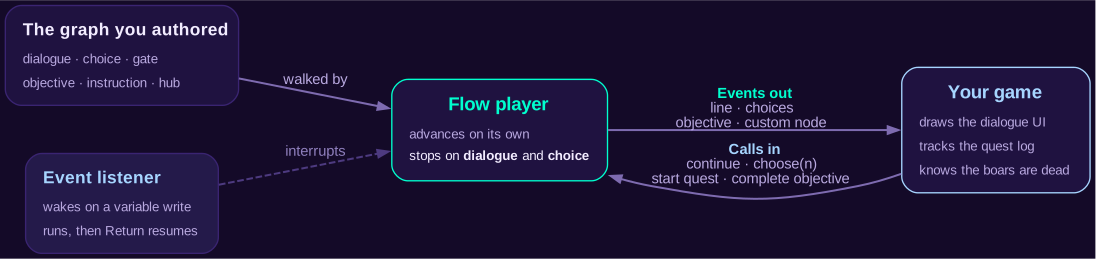
The flow player automatically runs instructions and evaluates gates. Hubs choose a branch. The player pauses when it reaches a node that your game must resolve.
Dialogue and choice nodes pause by default. You can configure other node types to pause when your game needs to perform work at those nodes.
The runtime emits events when the player pauses and when important state changes occur. Your game listens for these events:
- Dialogue: identifies a line and its speaker so your game can display it.
- Choice: provides the options and identifies options that the player can't select.
- Objective: reports activation or a state change for the quest log.
- Custom node: identifies a marker defined by your project, such as the start of a cinematic.
After handling an event, your game sends a command to the runtime. Commands can continue the graph or select an option. Other commands update an objective or start a quest.
Presentation
Narratyr doesn't render dialogue or quest interfaces. The runtime provides the content and available options, then your game presents them through its own interface.
Objective completion
The runtime activates objectives and tracks their state. Game code detects events such as an enemy defeat or an inventory change. It then tells the runtime to complete or update the related objective, and the graph reacts to that update.
Event listeners
A quest usually follows a main path, while an event listener watches a condition outside that path. When the condition becomes true, the listener runs its branch. The flow returns to its previous position after the branch finishes.
Listener conditions can use variables, operators, and declared pure functions. The runtime
checks them after variable, quest, or objective changes. For game-owned state, call
NotifyExternalStateChanged() (Unreal/Unity) or notify_external_state_changed() (Godot)
after the change. Notify on both falling and rising changes to re-arm listeners.
Variables and functions
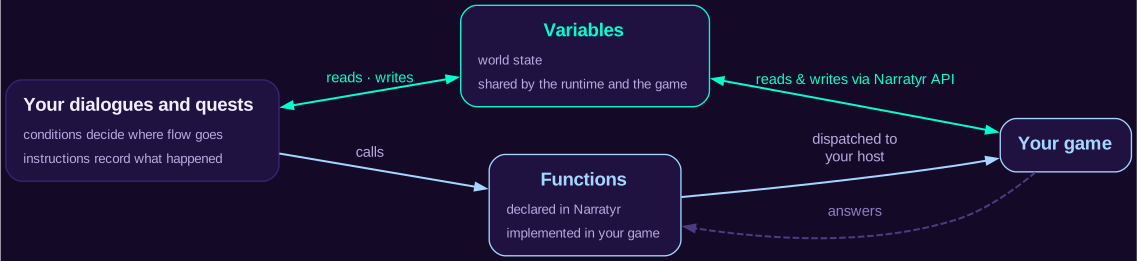
Variables and functions connect graphs to the game that runs them.
Variables
Variables store shared world state. Graphs and game code can both read and
write them. A dialogue can set MetTheJarl, and a distant quest can use that value in a gate.
Game code can also update the variable directly.
The variable name identifies the value for both sides. This lets a graph read game state without defining another copy. Saved games can also capture and restore runtime variables.
Functions
Functions call game code. A function definition contains a signature and return type but no implementation. Your game registers a function host when the runtime starts.
When a graph calls hasInventoryItem("Sword"), the runtime calls the matching method on the
function host. The exporter generates one typed method for each function declaration. Add the
implementation to your game after installing the updated module.
Choose variables or functions
- Use a variable for world state that Narratyr and game code both need. Variables work well for player decisions, locations, inventory, and other state that graphs must observe.
- Use a function for an action or a query based on state that the game already owns. A function can grant an item or check an inventory system.
Gates and Event Listeners accept queries declared pure. Call the external-state notification method after changing any game-owned state that those queries read.
Related pages
- Exporting: run each export operation and review engine support.
- Unreal Engine integration: use the runtime through Unreal classes and assets.
- Unity integration: install the package and use the C# runtime.
- Godot integration: install the add-on and use the GDScript runtime.
- Variables and Functions: configure both communication methods.
- Quests: learn about quest graphs and their runtime behavior.