Function definitions
Description: Declare game functions for use in conditions and instructions.
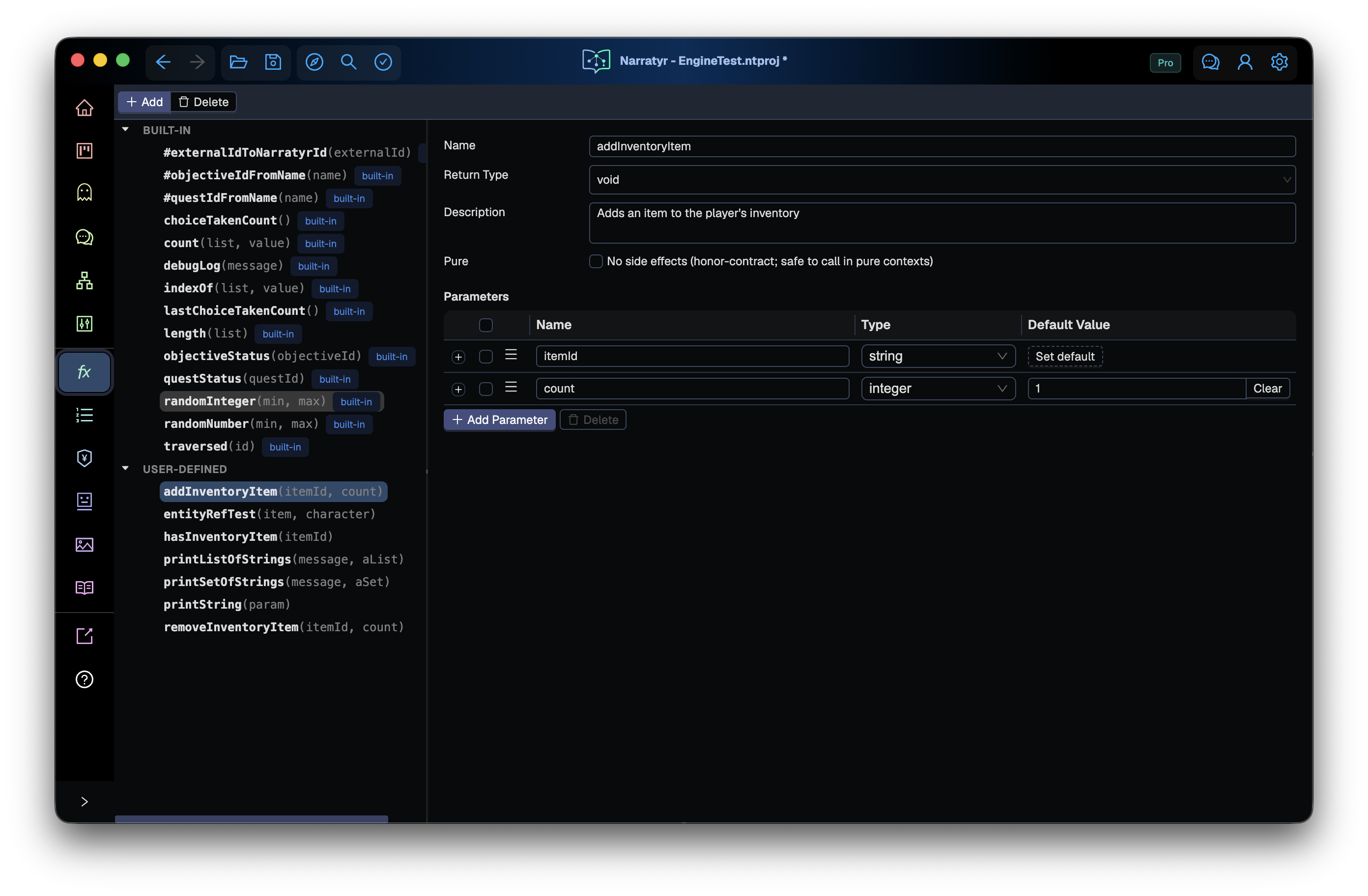
A lot of what a story needs to ask about, or do, lives in your game rather than in Narratyr.
A quest or dialogue may need to know whether the player is carrying a specific item, how much reputation they have with a faction, or if it's day or night in the game.
A function definition is one way to make this available to the expression language.
A function definition describes a call to your game but doesn't implement it. The editor uses the definition for completion and type checks. Exporters use it to create the corresponding engine interface, while your game code provides the behavior.
Narratyr knows nothing about a function beyond its signature and whatever description you write.
It can't tell you what hasReputationWith("Legion") will return, or whether calling it twice is safe.
Anything the next author needs to know should be in the description.
Definition fields
Functions appear in the Functions view. Select a function in the tree to edit its details.
| Field | Purpose |
|---|---|
| Name | Unique identifier used in expressions |
| Return type | string, integer, number, boolean, or void |
| Description | Guidance for people who call the function |
| Pure | Declares that the function has no side effects (i.e., it doesn't modify game state) |
| Parameters | Ordered arguments with names, types, defaults, and descriptions |
Parameters support primitive types, option sets, entity references, lists, and sets. Drag parameters to change their call order.
Functions return one primitive value or void. They can't return lists,
sets, option set entries, or entity references.
A parameter description appears in the editor. Its default value documents the behavior that your game should provide when a call omits the argument. Narratyr doesn't enforce or supply parameter defaults at runtime.
Entity reference parameters
For an entity reference parameter, completion lists matching entities and inserts the stable Narratyr ID. Document checks warn when a literal ID doesn't match an entity or the required specialized type.
These warnings don't prevent free text IDs for entities that exist only in the game. To use an
external ID from a Narratyr entity, select the entity through completion or call
#entity("ExternalId"). The longer #externalIdToNarratyrId spelling remains supported.
Built-in functions
Narratyr engine plugins provide some built-in functions. They include these groups:
- list operations such as
length,count, andindexOf - random values from
randomIntegerandrandomNumber - messages from
debugLog - traversal counters and the
questStatusorobjectiveStatusqueries evalto evaluate a named Expression definition
The editor displays built-in definitions as read-only entries. Narratyr refreshes this catalog when it opens a project, so older projects receive newer built-ins.
eval has an inferred result type and purity from its argument's body, including nested
definitions. It can return a list or option set entry even though custom functions can't
declare those return types. Rename a custom function called eval before using Expression values because this name
belongs to the built-in.
A custom engine runtime must implement the built-ins and expression evaluation. The expression abstract syntax tree defines their required behavior.
User-defined functions
Your project declares user-defined functions, and your game implements them. The Narratyr runtime calls a function host object when an expression uses one.
| Engine | Function host |
|---|---|
| Unity | Generates a NarratyrFunctionHost class. Subclass it, override its methods, and give the instance to the runtime. |
| Unreal Engine | Generates a UNarratyrFunctionHost object with Blueprint native events. Implement each event in C++ or Blueprint. |
| Godot | Calls methods by name on the object assigned as the host. Any object with matching methods can act as the host. |
Register the host when your game starts. After you add a function, run the engine's module installation or export step so the interface includes the new method.
Renaming a function also renames its generated method. Update the game implementation in the same change. A missing host or method causes an expression evaluation error at runtime.
Purity
Mark a function pure when it reads state and returns a value without side effects.
hasInventoryItem can be pure, while addInventoryItem changes state and should remain
impure.
The setting acts as a contract with your team because Narratyr can't inspect the game implementation. Random functions remain impure because each call changes their internal random state and can return a different value.
Gates and Event Listeners require pure functions, including calls inside
arguments and stored Expressions reached through eval. Validation, export, and simulator startup reject other functions in
these conditions. Narratyr can't verify the game implementation. Its code must honor the
purity setting.
Test functions in the simulator
The simulator uses mock return values because it doesn't have access to your game's function host. When a simulation starts, the mock panel lists calls found in the graphs. It also finds calls inside stored Expression definitions.
Calls with different arguments get separate rows.
hasInventoryItem("Sword") and hasInventoryItem("Shield") can return different values. A
fallback row for the function name handles other arguments. Set each return value before
running the related condition.
Mock values last until you reset the simulation and don't become part of the document.
Call behavior and validation
- Argument types: the editor checks types but doesn't check the number of arguments. Unity and Unreal convert a missing argument to zero or an empty string. Godot reports a runtime error.
- Descriptions: function and parameter descriptions appear in the editor. Unreal also adds them to the generated host as documentation comments.
- Deleted definitions: deleting a definition leaves its calls in expressions. Document checks report the unknown function. Use Find References before deletion.
- Reactive conditions: Gates and Event Listeners check again after variable,
quest, or objective changes. For inventory or other game state, call
NotifyExternalStateChanged()in Unreal/Unity ornotify_external_state_changed()in Godot after the state changes. These methods are available on the variable manager, quest manager, and flow player and refresh all active flows sharing that variable manager. Notify after both false and true transitions. - Simulator mocks: changing a mock value can trigger a listener or unblock a gate. Asynchronous listeners can create secondary flows. Use the Flow selector to inspect them. Step advances their bodies.
Next
Expressions defines function call syntax. Variables covers shared state, and Exporting explains how generated interfaces enter your game project.