Quests
Description: Build objectives, track progress, and connect quests to dialogue.
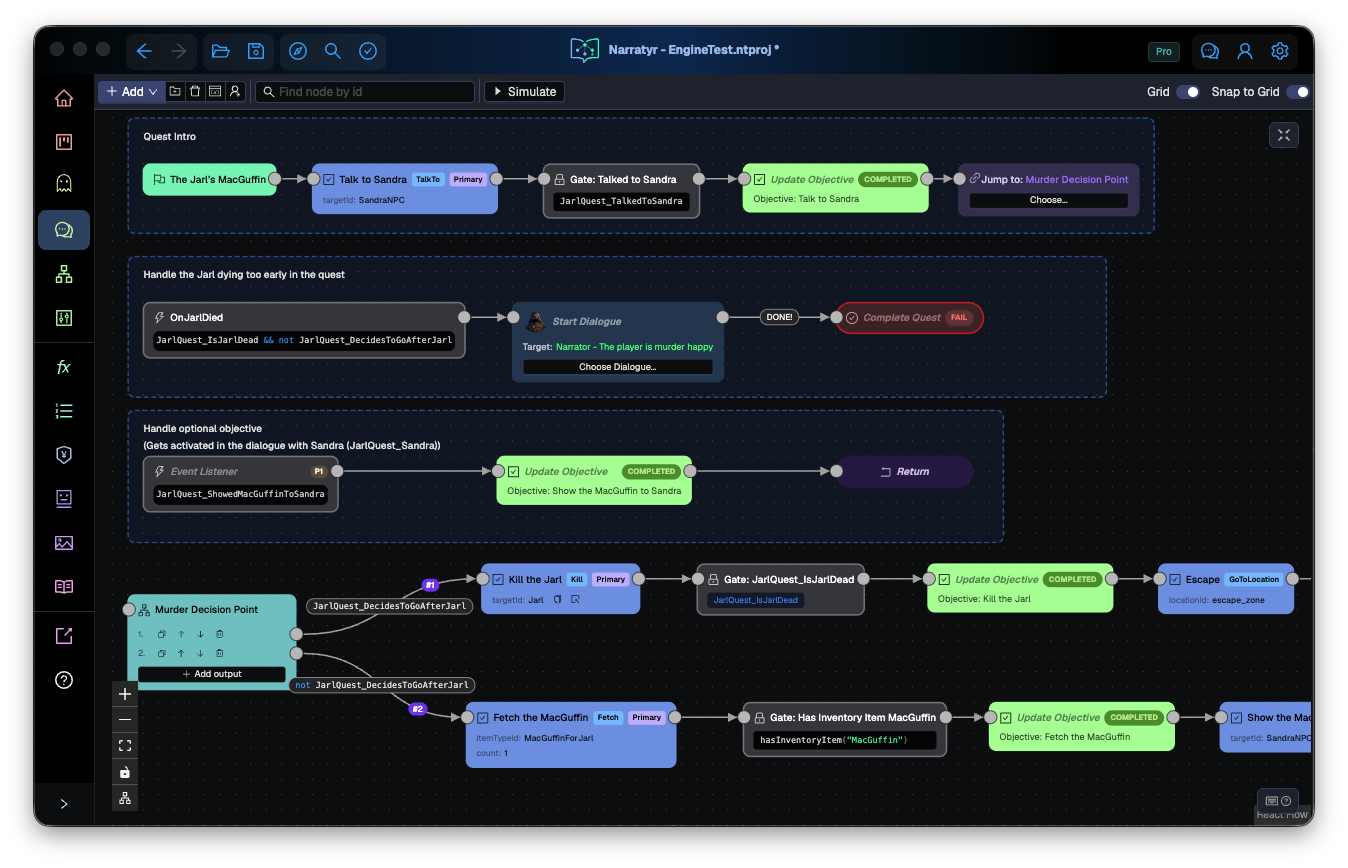
A quest graph describes player progress. It introduces objectives and changes their state as the runtime follows the graph. Connections also control branches and determine how the quest ends.
Narratyr creates one Quest Node as the entry for each quest graph.
Objectives
Objectives describe tasks that appear in the player's quest log.
- Objective: introduces a task such as "Kill the Jarl" and immediately continues. A later node updates the task when the player makes progress.
- Update Objective: changes an existing objective to another state. It can complete, fail, reopen, hide, or reveal the objective.
Update Objective is available in quest and dialogue graphs (shortcut U). Its Quest selector defaults to Current quest in a quest graph. Choose another quest to update one of its objectives, then select Objective. Changing Quest clears Objective. In a reusable fragment, Current quest means the parent running it. Objectives from shared fragments appear under each parent quest separately.
An objective can be optional, which excludes it from completion requirements. A hidden objective remains outside the quest log until another node reveals it.
Objectives can also belong to named groups. Groups organize a long quest into sections such as "Act 1" and "Act 2" and provide translated headings in the quest log.
To wait for an objective condition, connect an Objective to a Gate and then to an Update Objective. Other nodes can appear between the Objective and Gate as long as a connection leads to the Gate.
Branching and pacing
- Gate: pauses the flow until a condition becomes true.
- Hub Node: checks conditions on its outputs and immediately follows a matching branch.
- Fork: starts concurrent branches. Use it for objectives that begin together and can finish in any order.
- Event Listener: watches a condition outside the main flow. When the condition becomes true, it runs a separate branch and then returns to the previous flow.
- Return: ends an Event Listener branch or one secondary branch from a Fork.
- Jump Node: redirects the flow to another node in the same graph.
- Instruction Node: changes a variable or calls a function without pausing.
An Event Listener works well for an optional objective because the main quest can continue while the listener waits, while a Gate pauses its current branch.
End a quest
Complete Quest ends a quest with a success or failure result. A quest needs at least one Complete Quest node and can have different nodes for separate endings.
Split a quest across graphs
Use a Start Quest Fragment node to run part of the current quest in another graph. The fragment keeps the parent quest's identity. When the fragment finishes, the flow returns to the parent graph.
Use an asynchronous Start Quest node to begin an independent quest and continue the current flow immediately. For concurrent work within the current quest, use a Fork or Event Listener.
Create a Quest Fragment from the Add menu when a large quest needs another graph.
Connect quests and dialogue
Quests and dialogues use the same variables. A conversation can change a variable that a quest condition reads, without either graph referencing the other.
A Start Dialogue node creates a direct connection. It can begin at the dialogue entry or a specific node. The quest flow resumes after the conversation ends. See Variables and conditions for details about shared state.
Custom nodes
A Custom Node sends an event to your game for project-specific behavior, such as playing a sound or loading an area. Its fields provide the event data. A custom node can pause until game code resumes it, or it can continue immediately.
The custom nodes available in a graph come from your project definitions.
Debug a quest
The simulator runs the quest one node at a time. It shows the selected transitions and the conditions that controlled each branch.
Next
Build a quest provides a basic objective, Gate, and completion flow. Build a multi-objective quest adds concurrent objectives and multiple endings. Variables and Dialogues explain the systems that connect to quest graphs.